> ## Documentation Index
> Fetch the complete documentation index at: https://docs.obiguard.ai/llms.txt
> Use this file to discover all available pages before exploring further.
# Tracing
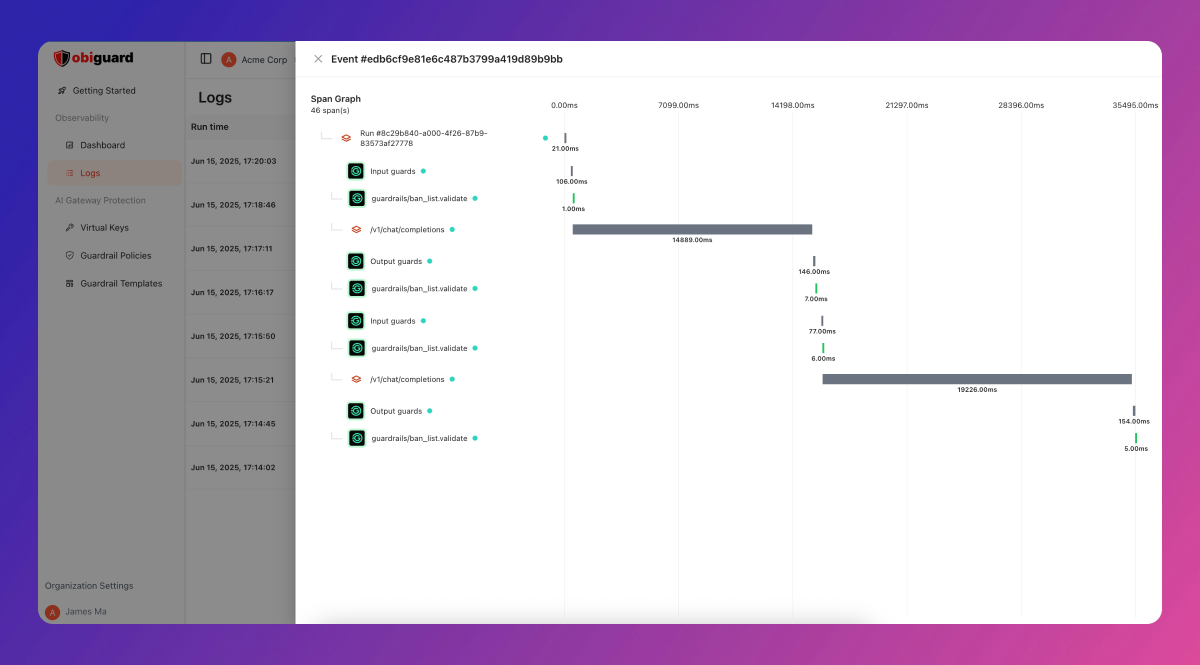
> Obiguard Tracing lets you track the full lifecycle of your LLM requests in a single, chronological view.
This is perfect for agentic workflows, chatbots, or multi-step LLM calls, by helping you understand and optimize your AI application’s performance.
 ## How Tracing Works
Obiguard uses OpenTelemetry-compliant tracing to monitor your LLM requests.
By attaching a trace ID to your requests, all related LLM calls are automatically grouped in the Traces View and displayed as “spans” within a trace.
A “span” represents a subgroup of LLM calls.
Depending on your instrumentation, a span can refer to a group within a trace or a single LLM call.
## Trace Tree Structure
Obiguard implements tracing using a tree-like structure, similar to OpenTelemetry.
Each node in this tree is a span, identified by a unique `spanId` and an optional `spanName`. Child spans reference their parent using `parentSpanId`. Spans without a parent become root nodes.
```
traceId
├─ parentSpanId
│ ├─ spanId
│ ├─ spanName
```
| Key | Node | Key - Python | Expected Value | Required? |
| ------------ | ---------------- | ------------- | -------------- | --------- |
| traceId | trace\_id | Unique string | YES | |
| spanId | span\_id | Unique string | NO | |
| spanName | span\_name | string | NO | |
| parentSpanId | parent\_span\_id | Unique string | NO | |
## Benefits of Tracing
* **Cost Analysis**: Monitor total LLM costs for each trace.
* **Debugging**: Quickly review all related requests in a trace and spot issues.
* **Performance Monitoring**: Gain visibility into the full request lifecycle and overall trace timing.
## How Tracing Works
Obiguard uses OpenTelemetry-compliant tracing to monitor your LLM requests.
By attaching a trace ID to your requests, all related LLM calls are automatically grouped in the Traces View and displayed as “spans” within a trace.
A “span” represents a subgroup of LLM calls.
Depending on your instrumentation, a span can refer to a group within a trace or a single LLM call.
## Trace Tree Structure
Obiguard implements tracing using a tree-like structure, similar to OpenTelemetry.
Each node in this tree is a span, identified by a unique `spanId` and an optional `spanName`. Child spans reference their parent using `parentSpanId`. Spans without a parent become root nodes.
```
traceId
├─ parentSpanId
│ ├─ spanId
│ ├─ spanName
```
| Key | Node | Key - Python | Expected Value | Required? |
| ------------ | ---------------- | ------------- | -------------- | --------- |
| traceId | trace\_id | Unique string | YES | |
| spanId | span\_id | Unique string | NO | |
| spanName | span\_name | string | NO | |
| parentSpanId | parent\_span\_id | Unique string | NO | |
## Benefits of Tracing
* **Cost Analysis**: Monitor total LLM costs for each trace.
* **Debugging**: Quickly review all related requests in a trace and spot issues.
* **Performance Monitoring**: Gain visibility into the full request lifecycle and overall trace timing.