> ## Documentation Index
> Fetch the complete documentation index at: https://docs.obiguard.ai/llms.txt
> Use this file to discover all available pages before exploring further.
# Making Your First Request
> Integrate Obiguard and secure your first LLM call in 2 minutes!
# 1. Create your guardrail policy
[Create](https://app.obiguard.ai/auth) or [log in](https://app.obiguard.ai/sign-in) to your Obiguard account.
Identify your orgnization and project.
Go to Guardrail Policies and choose the default Guardrail Policy or create a new one.
# 2. Get your Obiguard API Key
Grab your guardrail's API key from the "API Keys" page.
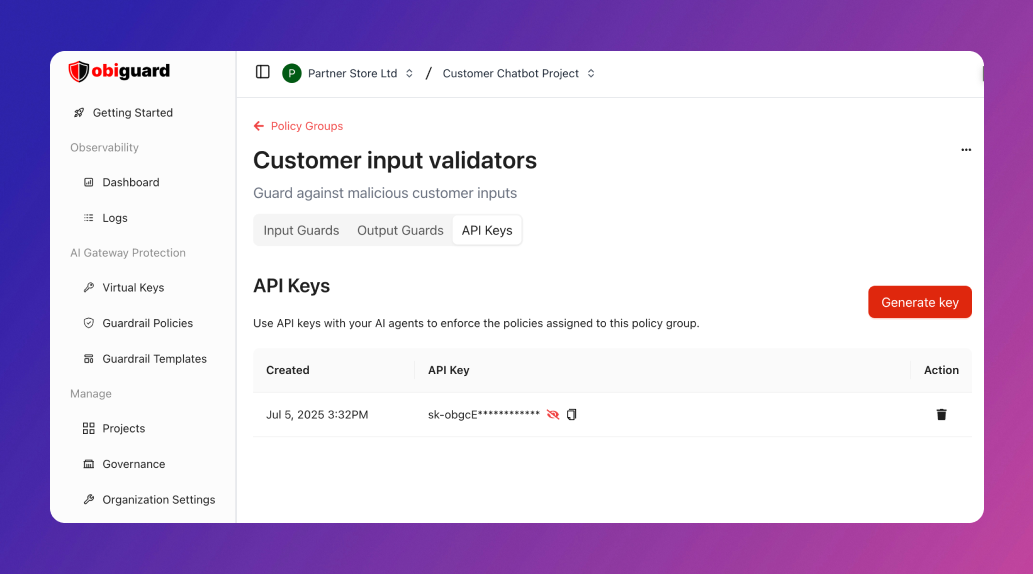 Based on your access level, you might see the relevant permissions on the API key modal - tick the ones you'd like, name your API key, and save it.
## 3. Integrate Obiguard
Obiguard offers a variety of integration options, including SDKs, REST APIs, and native connections with platforms like OpenAI, Langchain, and LlamaIndex, among others.
### Through the OpenAI SDK
If you're using the **OpenAI SDK**, import the Obiguard SDK and configure it within your OpenAI client object:
### Obiguard SDK
You can also use the **Obiguard SDK / REST APIs** directly to make the chat completion calls. This is a more versatile way to make LLM calls across any provider:
Once, the integration is ready, you can view the requests reflect on your Obiguard dashboard.
### Other Integration Guides
## 3. Next Steps
Now that you're up and running with Obiguard, you can dive into the various Obiguard features to learn about all of the supported functionalities:
Based on your access level, you might see the relevant permissions on the API key modal - tick the ones you'd like, name your API key, and save it.
## 3. Integrate Obiguard
Obiguard offers a variety of integration options, including SDKs, REST APIs, and native connections with platforms like OpenAI, Langchain, and LlamaIndex, among others.
### Through the OpenAI SDK
If you're using the **OpenAI SDK**, import the Obiguard SDK and configure it within your OpenAI client object:
### Obiguard SDK
You can also use the **Obiguard SDK / REST APIs** directly to make the chat completion calls. This is a more versatile way to make LLM calls across any provider:
Once, the integration is ready, you can view the requests reflect on your Obiguard dashboard.
### Other Integration Guides
## 3. Next Steps
Now that you're up and running with Obiguard, you can dive into the various Obiguard features to learn about all of the supported functionalities: